





Automations
Turn a completed Telegram order into a signed webhook call or a group message automatically, with rules you build once and reuse for every matching order.
Automations turns a completed order into external actions: a signed webhook call, a message posted to a Telegram group, or both. Each automation is a rule with three parts — when it fires, which orders it applies to, and what it does — built once and then running unattended.
Triggers
The only trigger available today is order completed: payment confirmed and delivery finished. Every rule you create matches against this event; there is no subscription, refund, or inventory trigger yet, regardless of any future-facing option you might see referenced elsewhere.
A rule can narrow which completed orders it reacts to: All products or a specific list of Selected products, and whether it should match Paid orders, Free orders, or both. Narrowing is free — it costs nothing whether or not a match produces an action.
Actions
An automation can turn on either or both actions; each one starts off, so a rule can be webhook-only, Telegram-only, or (while blocked from saving) neither.
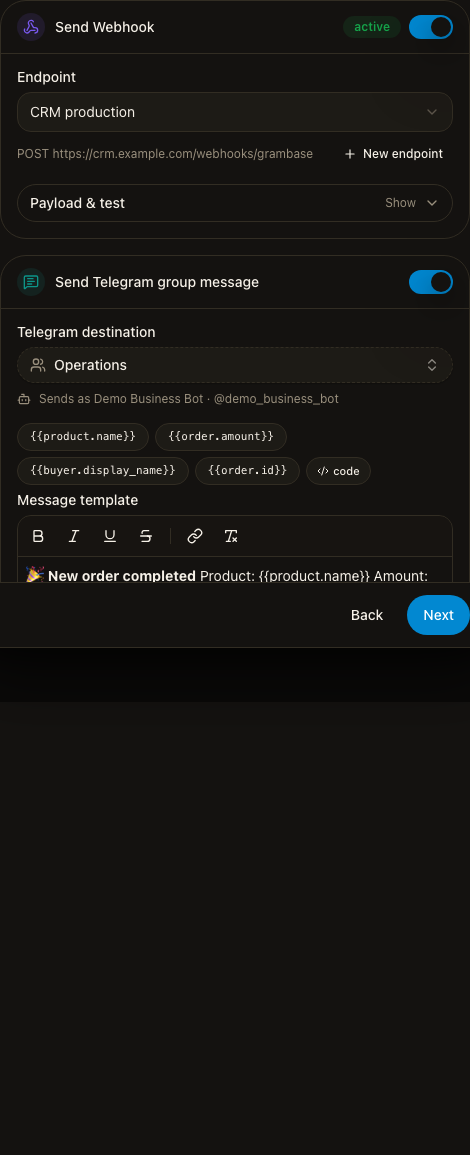
Send Webhook posts a signed JSON envelope to a Webhook endpoint you
choose. Every delivery carries an X-GramBase-Signature header — an
HMAC-SHA256 of the timestamp and raw body, keyed with the endpoint’s secret —
so your receiver can verify the request actually came from GramBase.
GramBase only requires a 2xx response; it does not expect any particular
response body. The action panel shows the exact request headers and body
GramBase sends, and a Send test button delivers one real request for
free, without consuming credits or creating an execution record.
Send Telegram group message posts a message to a group your Business Bot
already has permission to post in. The message is written in the same
editor used elsewhere in GramBase, with insertable tokens
({{product.name}}, {{order.amount}}, {{buyer.display_name}},
{{order.id}}) and a live preview of how it will render. If the bot cannot
post in the selected group — not added, or missing permission — the builder
shows the specific problem and blocks saving until it’s fixed. This action
also has a free Send test.
Creating a rule
From Automations, click Create automation. The builder walks four steps: When (name the rule and confirm the order-completed trigger), If (product scope and paid/free), Then (turn on webhook and/or Telegram actions and configure each), and Review (a summary of all three, plus the credit cost). You can save as a disabled draft or Save & enable directly.
Every summary cell in the rules list — trigger/conditions, actions — is itself an edit entry point: clicking one reopens the builder on just that section as a Save/Cancel form, rather than re-walking the whole wizard. Changes to a rule apply to future orders only; an order that already triggered a run keeps the rule version that was live when it ran.
Each rule can be toggled active or disabled from its row switch, and deleted from its row menu — deleting stops the rule and removes its history from this list, and cannot be undone.
1 credit is charged per external destination, at the point GramBase first attempts to reach it — a webhook and a Telegram message on the same rule are two separate destinations, so a match with both enabled costs 2 credits. A failed attempt still costs the credit it already spent; every retry after that, automatic or manual, is free.
Webhook endpoints
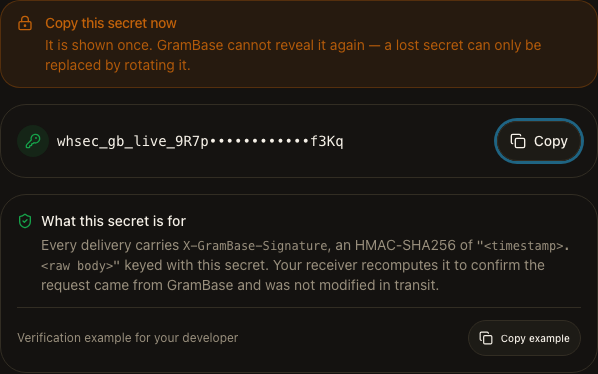
A Webhook action needs an endpoint — a destination URL — configured first, at Automations → Endpoints. Creating one takes a name and a public HTTPS URL; the URL is fixed once created (create a new endpoint to point deliveries elsewhere), and redirects are not followed. Saving shows the signing secret exactly once, along with a verification code snippet for your developer — GramBase cannot show it again, so a lost secret can only be replaced by rotating it.
From the endpoints list you can rotate an endpoint’s secret (the previous secret keeps working for a short overlap window, with both signatures sent during it) or disable it — disabling an endpoint that automations still point at stops their webhook deliveries until you re-enable it or switch those rules to another endpoint. You can also create a new endpoint directly from the automation builder without leaving the wizard.
Run history
Automations → Runs is the execution log: every run of every automation, newest first, kept for a limited retention window. Each row shows the automation, the destination, the result, credits spent, and when it ran; you can filter the log down to one rule from its row menu (View runs).
Opening a run shows one card per action with its status, attempt count, billing status, credits, and last-attempt time. A failed or blocked action can be retried directly from here — a blocked_credits action also offers a Top up shortcut. Automatic retries follow GramBase’s own retry schedule; a manual retry from this screen never charges a second credit for the same destination.
Known limits
- Order completion is the only live trigger. Subscription, refund, and inventory events are not available yet, whatever a future type or placeholder might suggest elsewhere.
- Webhook and Telegram group message are the only live actions. There is no delay, branching, or digest step.
Related
Was this page helpful?
Thanks — noted.