





Orders
Track every order from pending payment through delivery, review flagged crypto payments, and export order data.
Before you start
- You are a team member with the manage_orders permission.
Every purchase — free, Stars, or crypto — becomes an order the moment a buyer starts checkout. Orders is where you track it from there: whether it got paid, whether it was delivered, and, for crypto, whether GramBase is still checking the payment.
Order statuses
An order carries two independent statuses, each shown as its own badge:
- Payment: Pending, Paid, Failed, or Expired.
- Delivery: Pending, Sent, or Error.
Delivery only starts once payment is confirmed, so a paid order with delivery still pending shows as Processing rather than Unpaid in the Orders list.
For crypto, GramBase checks the payment behind the scenes before settling on one of those payment badges. An order it can’t confirm automatically — the paid amount doesn’t quite match what was expected — shows a special Review badge instead of Pending, and lands in the review queue described below. Confirming a payment yourself (see Confirm a payment manually) also shows up distinctly, so the order never looks like it was verified automatically when it wasn’t.
Order detail
Opening an order shows:
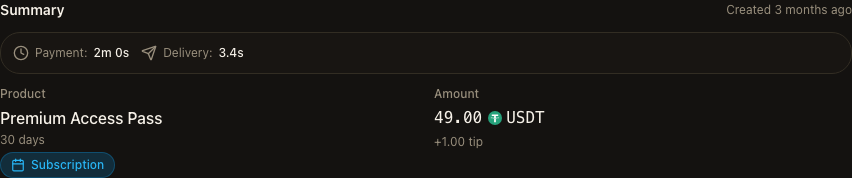
- Summary — product, variant, amount, and current payment/delivery status.
- Timeline — created, paid, and delivered timestamps, plus how long payment and delivery each took.
- Payment & chain — which surface the buyer checked out from, the payment rail, network, wallet addresses, transaction hash with an explorer link, and (for crypto) the deeper verification detail: confirmations, block number, last-checked time, and any amount difference from what was expected.
- Verification log and Delivery log — collapsible history of every automated check and delivery attempt, including errors.
- Subscriptions — for a subscription product, the groups this order granted access to and their status.
Order review
Orders → Review is a separate queue: crypto orders where GramBase found a
matching transaction but the paid amount differs from what the order expected
(gas fees, exchange fees, or buyer error are the usual causes). Every order
here is still pending payment, waiting on your decision.
Opening a row shows the expected amount, the actual amount received, the difference, and the transaction hash with an explorer link. From there you can:
- Approve — confirms the order as paid and starts delivery, using the transaction that was already matched.
- Reject — marks the order
failed. Rejecting requires a reason, which is saved with the order.
Re-delivering an order
If delivery failed, the order detail page has a retry action that requeues delivery without touching the payment.
Exporting orders
Both the main Orders list and a product’s own order list have an Export button. It builds a CSV of the orders matching your current filters (payment status, delivery status, date range, customer, product) — one row per order, including order ID, product ID, buyer’s Telegram ID, payment status, verification status, delivery status, quote asset and amount, transaction hash, and creation time. The export is capped at 100 rows per run. Rather than downloading in the browser, GramBase sends the CSV file to you on Telegram, and the page confirms with a toast once it has been sent.
Known limits
- Exporting produces at most 100 rows per export, respecting whatever filters are currently applied. It does not download a file to your browser — the CSV is sent to you on Telegram.
Related
Was this page helpful?
Thanks — noted.