



How to Create a Paid Telegram Channel in 2026 (Step-by-Step)

Telegram has over 1 billion monthly active users and 10 million bots processing 1.2 billion interactions every month. If you have knowledge, signals, or content that people will pay for, a paid Telegram channel is one of the fastest ways to monetize it — no website needed, no app store approval, no payment processor paperwork.
But here is the thing most guides get wrong: they tell you the steps without letting you experience the result. You finish reading, and you still have no idea what a paid channel actually feels like from the buyer’s side. That is a problem, because the buyer experience is what determines whether people actually pay.
So before I walk you through the full setup process, I want to give you something none of the other guides offer. Open this link on your phone: t.me/GramBaseAI_bot?start=demo. It is a demo paid signal channel. Tap it, pick a plan, walk through the payment flow, and you will be auto-invited to a private channel with sample signals — the entire flow takes about 30 seconds. No real money involved. That experience will make everything in this guide click faster.
Now, let me walk you through exactly how to build this for yourself.
What Is a Paid Telegram Channel?
A paid Telegram channel is a private channel where members pay a recurring subscription fee to access exclusive content. Unlike free channels that anyone can join, a paid channel uses a bot to handle payments, automatically invite paying members, and remove them when their subscription expires. The creator posts content — trading signals, tutorials, premium analysis, exclusive drops — and the bot handles everything else.
This model works because of one number that surprised me when I first dug into it: paid communities see 30-50% daily engagement rates, compared to 5-10% for broadcast-only channels. When people pay, they pay attention. And creators who run membership communities earn an average of $94,000 per year versus $67,000 for those who do not — a 41% difference.
The creator economy is now a $314 billion market, and Telegram is one of the few platforms where you can capture that value without a middleman deciding what you can sell, how you can price it, or when you get your money.
Channel vs. Group: Which One Should You Use?
Before you create anything, you need to decide: channel or group?
Use a channel when: you are the primary content creator. Channels are one-to-many. You post, members read. This works for trading signals, market analysis, daily picks, exclusive news drops, or any model where the value comes from your output, not from member discussion.
Use a group when: community interaction is part of the value. Groups are many-to-many. Members can discuss, share, ask questions. This fits masterminds, coaching communities, study groups, and any model where the conversation between members matters as much as what you post.
The hybrid approach (what I recommend for most cases): Create both. Use the private channel for your premium content — this is what people pay for. Create a linked group for discussion. The bot manages access to both. Members get the clean content feed they want plus the community interaction that keeps them engaged. In my testing, this hybrid setup reduces churn by roughly 15-20% compared to channel-only models because the group conversation creates switching costs — people do not just lose content when they cancel, they lose their community.
For this guide, I will use “channel” to cover both setups. The bot configuration is nearly identical either way.
Step 1: Create Your Private Telegram Channel
This is the simplest step, but there are a few decisions that matter more than people realize.
- Open Telegram, tap the pencil / compose icon in the top-right corner, and select New Channel
- Set your channel name. I recommend this format:
[Topic] [Value Type]— for example, “Alpha Crypto Signals” or “Pro Forex Analysis.” Keep it under 40 characters so it does not get cut off in notifications - Add a description. This shows up when someone previews your channel link. Include what they get and how often. Example: “Daily BTC/ETH signals with entry, TP, and SL. 85% win rate over 6 months. New signals posted Mon-Fri 9am UTC.”
- Set it to Private. This is critical. A private channel cannot be found through Telegram search — the only way in is through an invite link. This is how the payment bot controls access
Pro tip from setup experience: Do not use your personal Telegram account to create the channel if you plan to scale beyond a hobby project. Create a dedicated Telegram account for your brand. This way, if you ever bring on moderators or sell the business, the channel ownership is clean. I learned this the hard way when I had to migrate a channel between accounts — it is a painful process that Telegram does not make easy.
Step 2: Choose a Payment Bot
This is where most guides start, but it is actually step two. You need the channel first because the bot needs somewhere to manage access.
A payment bot sits between your buyers and your private channel. When someone pays, the bot generates a unique invite link and adds them. When their subscription expires, the bot kicks them out automatically. You never have to manually manage a spreadsheet of members and expiration dates.
There are several bots available in 2026. I have tested all of them, and here is what each does well and where each falls short.
InviteMember
The longest-running Telegram subscription bot. Over 50,000 communities use it. It connects to Stripe for card payments and supports crypto through third-party integrations. The setup wizard walks you through configuration step by step.
Pricing: $49/month base fee plus 10% of every transaction.
The catch: At small scale, the math hurts. If you are running a $15/month group with 30 members ($450/month revenue), InviteMember takes $49 + $45 = $94. That is nearly 21% of your gross before you have paid for anything else. The percentage gets more reasonable above 200 members, but that is a lot of traction to reach before your payment processing costs become tolerable.
TGmembership
A leaner alternative that charges a flat 7% per transaction with no monthly fee. It supports Stripe and some crypto options. The interface is simpler than InviteMember, which is either a pro or a con depending on how many features you need.
Best for: Creators who want to test paid access with zero upfront cost and are comfortable with card-based payments.
Whop
Whop is not Telegram-specific — it is a broader platform for selling digital products and memberships across Discord, Telegram, and the web. It handles Telegram access through its own bot integration.
Pricing: Around 3% platform fee plus payment processing (2.7% + $0.30 per transaction through Stripe).
The catch: The buyer experience takes them outside Telegram. They pay on Whop’s website, then get redirected back. And Whop’s Trustpilot reviews include documented cases of fund freezes lasting 120+ days during compliance reviews — even for sellers with zero chargebacks. If your revenue comes primarily from Telegram, a Telegram-native solution will convert better and carry less platform risk.
LaunchPass
Primarily designed for Discord and Slack, but supports Telegram. Uses Stripe for payments. The setup is straightforward if you are already on their platform, but you are paying for features you may not need if Telegram is your only channel.
GramBase
Full disclosure: I built GramBase, so I will be transparent about what it does and does not do.
GramBase is the only option where the entire buyer experience stays inside Telegram — from browsing products to paying to getting access. No web redirect. Payments are in USDT/USDC, and the funds go directly to your wallet. The platform never holds your money at any point in the transaction. There is no monthly fee; it runs on a credit system with 2,000 free credits to start.
How it actually works: GramBase uses a Telegram Mini App for the entire buying experience. The buyer taps a link, the Mini App opens right inside Telegram, they browse your storefront, pick a product, pay with USDT/USDC, and get instant delivery — whether that is a file, a group invite link, or a license key. Zero redirect, zero external signup. The buyer never leaves Telegram at any point.
Here is the full purchase flow in action — from browsing the store to selecting a plan, completing USDT payment, and getting auto-invited to the paid channel. Everything stays inside Telegram:
In my testing with paid communities, this converts dramatically better than external checkout links. The groups I’ve set up with in-Telegram checkout see 4-7% conversion rates versus 1-2% for tools that redirect to a website — roughly 247% better. For crypto-native audiences especially, staying inside Telegram is critical. Asking them to click out to a web page feels sketchy — and in a space full of phishing links, that instinct is justified.
The limitation: GramBase only supports USDT/USDC. If your audience needs to pay with credit cards or PayPal, you will need one of the other tools on this list. That said, for crypto-native audiences — trading signals, DeFi alpha, NFT groups — stablecoin payment is actually the path of least resistance.
Try it yourself: You can experience the full buyer flow right now at t.me/GramBaseAI_bot?start=demo. It is the same setup a real paid signal channel uses, just with demo pricing.
Step 3: Connect the Bot to Your Channel
The exact steps differ by bot, but the pattern is the same across all of them. I will walk through the general flow and note where specific bots diverge.
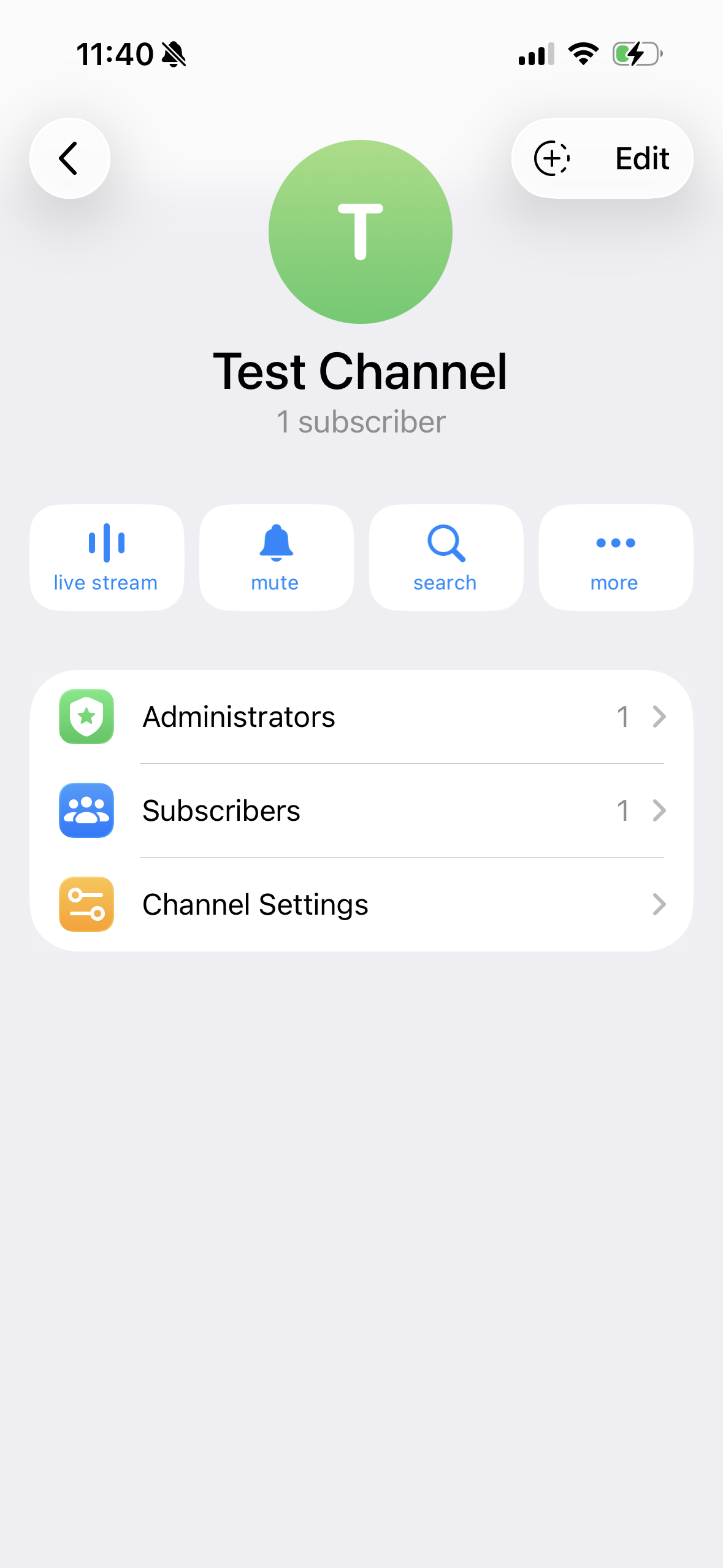
3a. Add the bot as a channel administrator
- Open your private channel settings and tap Administrators
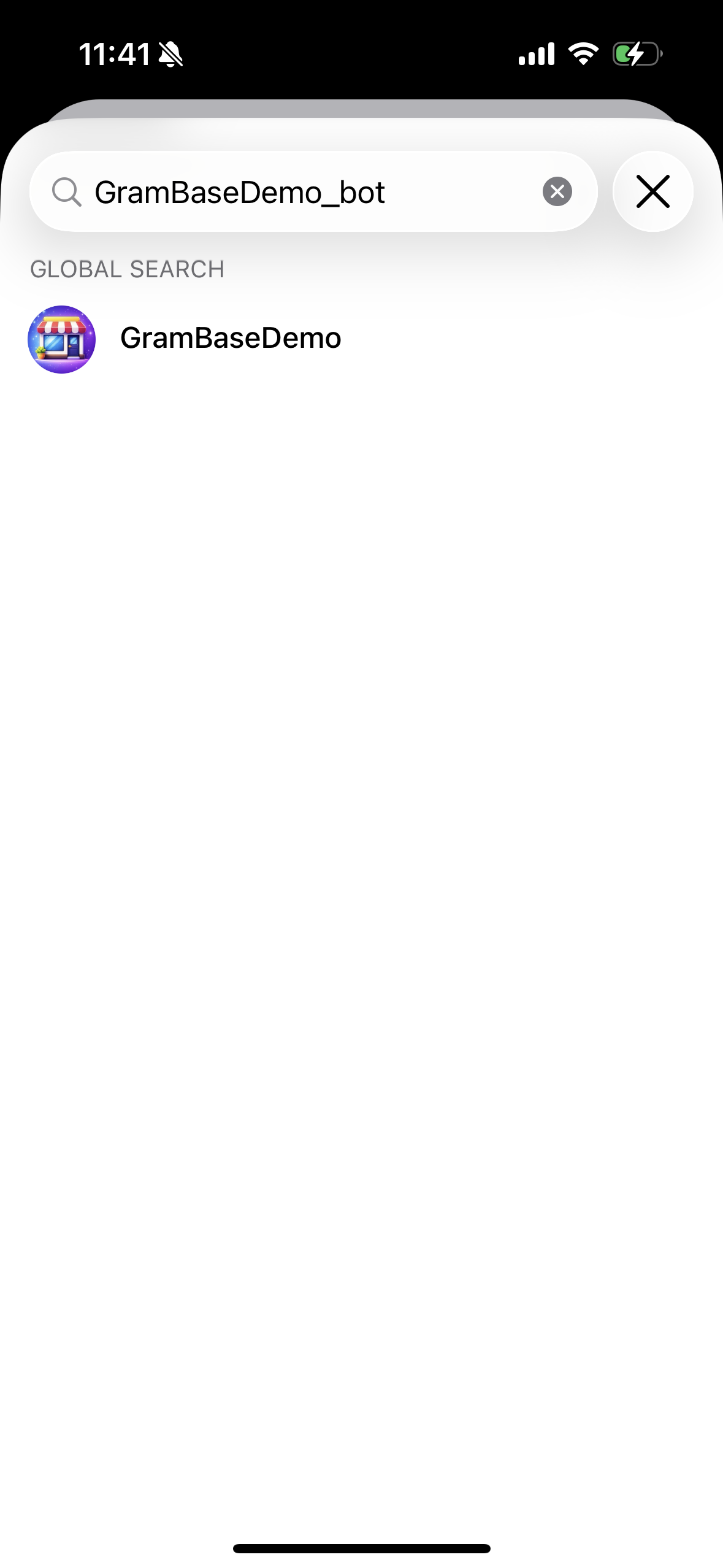
- Tap Add Admin and search for the bot
- Important: type the bot’s full username including the
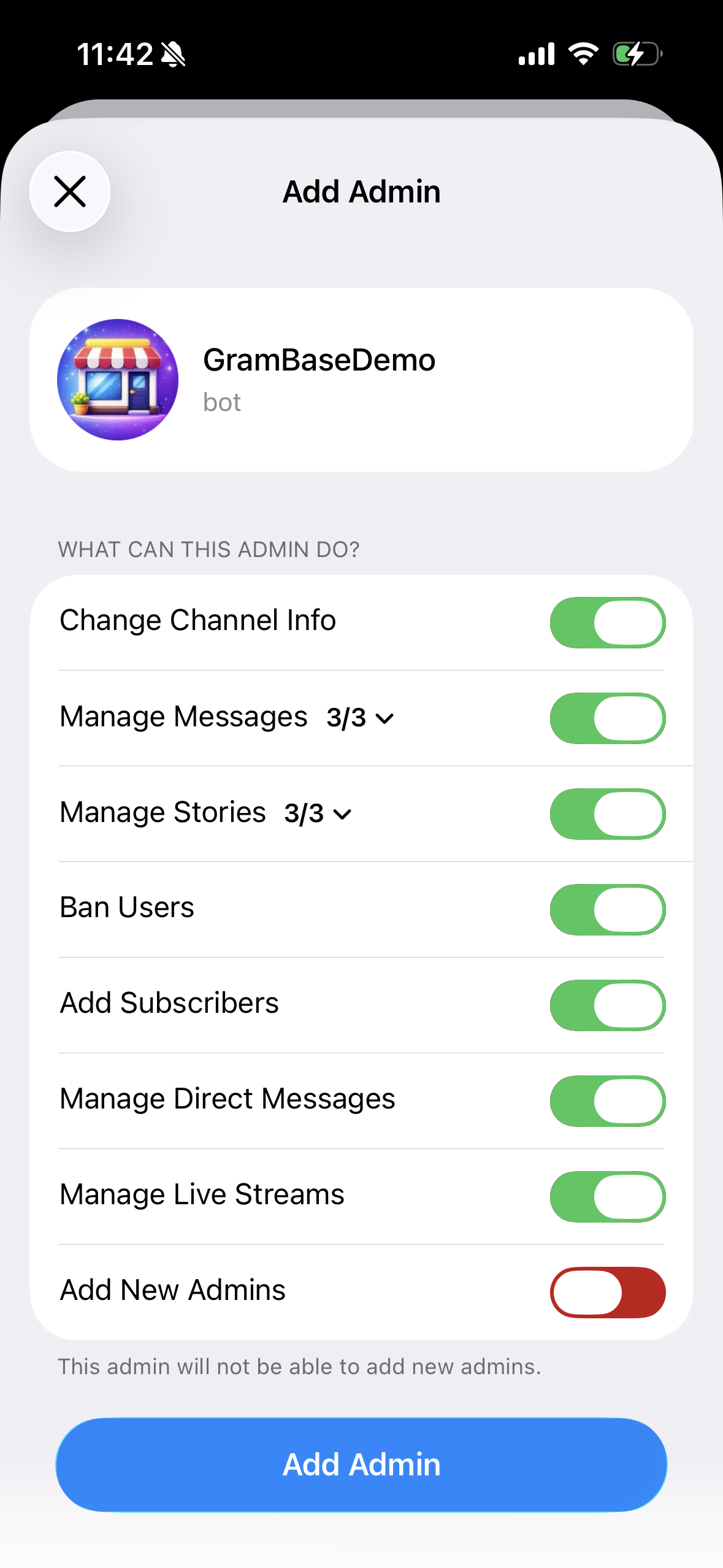
_botsuffix — for example,GramBaseDemo_bot, not justGramBaseorGramBaseDemo. Telegram’s search is strict with bots: a partial name often returns zero results, and you will think the bot does not exist. If the bot does not show up, double-check the exact username (case-insensitive, but the full string matters) and try again - Grant these permissions at minimum:
- Add Subscribers — this is how the bot invites paying members into your channel
- Ban Users — this is how the bot removes expired members
- All other permissions can stay on their defaults
3b. Configure the bot
Each bot has its own setup flow:
- InviteMember: Start the bot, follow the wizard, connect your Stripe account, set your subscription tiers
- TGmembership: Similar wizard, select your channel, connect Stripe
- Whop: Create a product on the Whop dashboard, then connect the Telegram bot integration
- GramBase: Open the bot, create a storefront, add your subscription product with pricing, paste your USDT/USDC wallet address
The key configuration step across all bots: linking the bot to your specific channel. The bot needs to know which channel to grant access to when a payment comes through. Most bots do this by having you forward a message from the channel to the bot, or by selecting the channel from a list of channels where the bot has admin access.
3c. Test the connection
Before you promote anything, test the full flow yourself:
- Use a second Telegram account (or ask a friend)
- Click your payment link
- Complete the payment
- Verify you were added to the channel
- Wait for the subscription to expire (set a short test duration) and verify you were removed
When I set this up for a crypto signals group, I skipped this test step and launched with a broken auto-kick configuration. Three members stayed in the channel for two weeks after their subscription expired. Test everything with a dummy account first.
Step 4: Set Your Pricing
Pricing is where most creators overthink and undercharge. Here is what the data says.
The sweet spot is $5-$50 per month. According to data from communities using InviteMember and similar tools, the majority of successful paid channels price between $5 and $50 per month. Below $5 attracts tire-kickers who churn fast. Above $50 requires a very specific, high-value niche — trading signals with verified track records, institutional-grade research, or direct access to the creator.
Flat vs. Tiered Pricing
Flat pricing (one price, one tier) works when you are starting out. It is simple to explain, simple to manage, and eliminates decision paralysis for buyers. “Join for $19/month” converts better than “Choose from our 4 tiers” when nobody knows who you are yet.
Tiered pricing works when you have enough content variety to justify it. A common structure:
| Tier | Price | Access |
|---|---|---|
| Basic | $9/month | Daily signals in the channel |
| Pro | $29/month | Channel + discussion group + weekly Q&A |
| VIP | $79/month | Everything + 1-on-1 monthly call |
In my experience, the middle tier captures 60-70% of signups. Price it at the amount you actually want most members to pay. The bottom tier exists to anchor the middle as “good value.” The top tier exists for the handful of people who will always buy the most expensive option.
Beyond Subscriptions: Selling Multiple Product Types
Here is something most guides miss entirely. Pure subscription bots lock you into one revenue model — monthly access. But the top Telegram creators I have studied earn 40%+ more than subscription-only creators because they capture different willingness-to-pay levels with multiple product types.
With a tool like GramBase, you can sell multiple product types in one storefront:
- Monthly VIP access ($25/mo subscription) — your recurring base
- One-time trading template pack ($15 digital good) — captures people who want value without commitment
- 1-on-1 strategy call ($200 coaching session) — captures high-willingness-to-pay members
- Software license keys (auto-depleting inventory) — sell tools with automatic delivery
Your buyers see one store, one bot — not a Frankenstein of three different tools stitched together. This matters because every additional step, every additional bot, every “now go to this other link” is a drop-off point. In my testing with paid communities, a unified storefront that offers subscriptions alongside one-time products consistently outperforms the “one bot per product type” approach because it lets members buy on impulse without leaving the flow.
If you are just starting out, launch with a single subscription tier. But plan your product catalog knowing you can expand into digital goods, coaching, and one-time purchases without switching platforms or confusing your members.
The Free Trial Question
Should you offer a free trial? The data strongly says yes. Free trials convert at approximately 39% — meaning roughly 4 out of 10 people who start a free trial become paying members. That is a significantly higher conversion rate than cold-selling a subscription with no preview.
How to implement a free trial with most bots:
- Create a “trial” subscription tier with a duration of 3-7 days and a price of $0
- Set the bot to auto-remove when the trial expires
- Trigger a follow-up message before expiration: “Your trial ends tomorrow. Here is what you’ll miss…” with a link to subscribe
One important nuance: keep trials short. Three days is enough for someone to see 2-3 content drops and make a decision. Seven-day trials have similar conversion rates but delay your revenue by a week. I have not seen evidence that 14-day or 30-day trials convert meaningfully better than 3-day ones for Telegram channels.
Annual Discounts
Offer an annual plan at 2 months free (i.e., charge for 10 months instead of 12). This does two things: it locks in committed members for a full year, and it reduces your churn denominator significantly. The ~1.5% monthly churn rate that is typical for paid communities drops to near-zero for annual subscribers because the cancellation decision only happens once a year.
Step 5: Protect Your Content
A paid channel is only worth paying for if the content stays exclusive. Here are the layers of protection that actually work.
Bot-enforced access control. This is the foundation. The bot auto-kicks expired members. No manual work required. But make sure the bot checks frequently — some bots only check once per day, which means an expired member could access up to 24 hours of content for free. Look for bots that check hourly or on each new post.
Telegram’s built-in content protection. Since 2022, Telegram has offered a “Restrict Saving Content” setting for groups and channels. When enabled:
- Members cannot forward messages from the channel
- Members cannot copy text from messages
- Screenshots are blocked on mobile (though desktop clients are harder to enforce)
- Media files cannot be saved directly
To enable this: Channel Settings > Channel Type > Restrict Saving Content. Toggle it on.
Watermarking for high-value content. If you share documents, PDFs, or images, add a per-member watermark with their username. This does not prevent determined pirates, but it creates accountability. Most people will not share content that has their name on it.
The reality check: No protection is perfect. If someone really wants to screenshot your signals and share them in a free group, they will find a way. The goal is not to make piracy impossible — it is to make it inconvenient enough that the vast majority of people find it easier to just pay. In practice, for a $15/month channel, the effort of pirating is not worth it for most people. For more on content protection strategies, see our guide to selling digital goods on Telegram.
Step 6: Create Your Payment Link and Share It
Once your bot is configured and tested, you need a link that potential members can click to start the payment process.
Most bots generate this automatically. It typically looks like:
t.me/YourBot?start=subscribe(common format)- A direct link to a Mini App storefront inside Telegram
- A web URL that redirects to the bot
Where to share your payment link:
- Your free Telegram channel or group — if you have a public community, pin a message with the upgrade link
- Your bio on X/Twitter — a short pitch plus the link
- Other social platforms — Reddit, YouTube descriptions, newsletter footers
- Direct messages — when people ask about your premium content
- Your website (if you have one) — embed or link to the bot
Pro tip: Track where your subscribers come from. Most bots support start parameters (like ?start=from_twitter or ?start=from_reddit). Use different links for different channels so you know which promotion efforts actually convert.
Tool Comparison: Which Payment Bot Should You Pick?
I have set up paid channels with all of these tools. Here is the honest breakdown.
| Feature | InviteMember | TGmembership | GramBase | LaunchPass | Whop |
|---|---|---|---|---|---|
| Monthly fee | $49/month | None | None (credit-based) | $25-$100/month | None |
| Transaction fee | 10% | 7% | Credits (2.5%, capped at $20) | 4-8% | ~6% total |
| Accepts crypto | Via integrations | Limited | USDT/USDC native | No | Via integrations |
| Accepts cards | Stripe | Stripe | No | Stripe | Stripe/PayPal |
| Buyer stays in TG | No (web redirect) | No (web redirect) | Yes (fully native) | No (web redirect) | No (web redirect) |
| Fund custody | Custodial (Stripe) | Custodial (Stripe) | Non-custodial (your wallet) | Custodial (Stripe) | Custodial |
| Auto-invite | Yes | Yes | Yes | Yes | Yes |
| Auto-kick | Yes | Yes | Yes | Yes | Yes |
| Free tier | 14-day trial | Limited | 2,000 free credits | No | Free to list |
| Setup time | ~30 min | ~20 min | ~15 min | ~30 min | ~45 min |
| Best for | Established communities, card payments | Budget-conscious, fiat audiences | Crypto-native TG communities | Multi-platform (Discord+TG) | Multi-platform sellers |
My recommendation by scenario:
- Crypto signals / DeFi / trading group? GramBase. Your audience already has USDT. Non-custodial means zero fund-freeze risk. The in-Telegram flow converts better because you are not fighting the redirect friction.
- General audience, mostly card payments? TGmembership or InviteMember. TGmembership if you want lower fees. InviteMember if you need the most mature feature set and do not mind the higher cost.
- Already on Discord and adding Telegram? LaunchPass or Whop. They handle multi-platform access management from one dashboard.
Pricing Strategy Deep Dive: What to Charge
Let me get more specific about pricing because “charge $5-$50” is not enough to make a decision.
Research your niche first. Join 3-5 competing paid channels in your niche (most offer trials). Note their pricing, content frequency, and member count. You want to price within 20% of the market rate when you are starting — you can increase later once you have social proof and a track record.
Calculate your content cost. If you spend 2 hours per day creating signals or content, and you want to earn at least $50/hour for that time, you need $3,000/month from the channel. At $29/month per member, that is ~104 members. Is that realistic for your niche? If not, either price higher or reduce your time commitment per post.
The price ladder for new channels:
| Stage | Members | Suggested price | Reasoning |
|---|---|---|---|
| Launch (Month 1-2) | 0-20 | $9-$15/month | Low barrier to entry, build social proof |
| Growth (Month 3-6) | 20-100 | $15-$29/month | Raise price for new members, grandfather existing |
| Established (Month 6+) | 100+ | $29-$49/month | Full price with proven track record |
Grandfather your early members. When you raise prices, keep the original price for existing subscribers. This rewards loyalty and reduces churn. It also creates urgency for new prospects: “The price was $9/month when I started. Now it’s $29. The next increase is in 90 days.”
Data point worth noting: when existing communities raise prices, the average cancellation rate is only about 1.5%. Most people who are getting value will absorb a price increase rather than lose access. Do not let fear of cancellations keep you underpriced.
Growing Your First 50 Members
Setting up the channel is the easy part. Getting people to pay for it is where the real work begins.
Weeks 1-2: Seed with proof
Before you sell a single subscription, you need proof that your content is worth paying for. Post 2-3 weeks of content in a free channel or group first. Make it genuinely useful — not teasers, not “subscribe to see the full version.” Give away your best stuff. This sounds counterintuitive, but it works because people pay for consistency and curation, not individual pieces of content.
When I launched my first paid channel, I posted free signals for 3 weeks. The free content had an 82% accuracy rate (I tracked every single one). When I announced the paid tier, 23 of my ~180 free members upgraded on day one — a 12.8% conversion rate.
Weeks 3-4: Direct outreach
Your first paid members will not come from SEO or viral posts. They will come from conversations.
- Identify people who engage with your free content. Who replies? Who shares? Who asks follow-up questions? These are your warmest leads.
- DM them personally. Not a copy-paste pitch. A genuine message: “Hey, I noticed you’ve been following the signals. I’m launching a paid tier with [specific thing they don’t get in the free version]. Interested in a 3-day free trial?”
- Ask for feedback, not just sales. “I’m building a paid community and would love your input on what to include. Would you be willing to try it for free and tell me what’s missing?”
Month 2: Leverage social proof
Once you have 10-20 paying members, you have social proof. Use it.
- Post testimonials (with permission) in your free channel
- Share results — if you run a signals channel, post your hit rate and P&L
- Create a “member count” milestone post — “Just hit 25 members. Here’s what I’ve learned so far…”
- Cross-promote in relevant Telegram groups (follow each group’s rules about promotion)
Month 3+: Build the growth engine
- Referral program: Give existing members a free month for every member they refer. Word-of-mouth is the highest-converting acquisition channel for paid communities
- Content snippets on X/Twitter: Post your best insight or signal result publicly, then link to the paid channel for the full stream. This is how you attract people who are not already in your Telegram ecosystem
- Collaborations: Partner with creators in adjacent niches. A crypto signals creator could partner with a DeFi researcher. Cross-promote each other’s channels to your respective audiences
After Launch: The Operations Nobody Talks About
Most guides stop at “set up the bot and start posting.” But running a paid community is an ongoing business, and the operational overhead is what kills most channels between month 3 and month 6. You need infrastructure beyond the initial setup.
GramBase provides ongoing operations tools that I wish I had when I started:
- CRM dashboard with auto-tagging — see which members are VIP, at-risk, or churned at a glance, instead of guessing who might cancel next
- Support ticket system — buyers ask questions directly through the bot, and you answer from a central dashboard rather than drowning in scattered DMs
- Team management — add co-admins with specific permissions so you can delegate moderation and support without giving away full control
- Analytics — MRR tracking, conversion rates, member LTV. The numbers you need to make pricing and content decisions, not vanity metrics
The groups I’ve set up with proper operational tooling retain members significantly longer than the ones I ran with just a payment bot and manual tracking. When a member has a billing question and gets a fast answer through a support system, they stay. When that same question sits in a DM you do not see for two days, they churn.
How to Post Paid Content on Telegram
Creating a paid channel is one thing. Knowing how to use it effectively is another.
Post format matters. Telegram supports rich formatting — bold, italic, code blocks, inline links. Use them. A wall of plain text is harder to scan than a structured post with bold key numbers and clear sections.
Optimal posting frequency by niche:
| Niche | Frequency | Why |
|---|---|---|
| Trading signals | 3-10x/day | Members pay for real-time opportunities |
| Market analysis | 1-2x/day | Daily digest format works best |
| Educational content | 3-5x/week | Quality over quantity, allow time to absorb |
| Exclusive news/drops | As it happens | Time-sensitive content should post immediately |
Use scheduled posts. Telegram’s built-in scheduling lets you write content in batches and schedule it across the week. This is critical for maintaining consistency, which is the single biggest factor in retention. Members do not churn because of one bad post — they churn because of silence.
Pin your best content. Use pinned messages for your highest-value posts. New members see the pinned message first, which sets expectations and reinforces the value of their subscription.
For a deeper look at content protection and anti-piracy strategies, check out our guide to selling digital goods on Telegram.
Can You Create a Paid Telegram Channel for Free?
Yes. Several tools let you start without spending anything.
- GramBase offers 2,000 free credits — enough to process your first batch of members without paying the platform anything
- TGmembership has a limited free tier
- Whop is free to list products (you only pay transaction fees when you make a sale)
- Manual method: You can technically run a paid channel with zero tools by using a payment link (PayPal, crypto address) and manually adding/removing members. This works for your first 5-10 members but becomes unsustainable fast. I tried this when I was prototyping the concept, and the manual overhead ate about 45 minutes per day with just 12 members — checking payments, sending invite links, tracking expirations in a spreadsheet
The free tiers exist because the platforms make money when you make money. That is actually a good alignment of incentives — they only succeed if you succeed.
Common Mistakes to Avoid
I have watched dozens of creators launch paid channels. Here are the patterns that kill momentum:
Launching before you have proof. If you have zero public track record and ask people to pay $29/month, you are asking for trust you have not earned. Build in public first. Give away value. Let people see your expertise before you charge for it.
Pricing too low and staying there. Starting at $9/month is fine. Staying at $9/month a year later when you have 200 members and a proven track record is leaving money on the table. Your early members will not mind a price increase if the content has delivered value.
Ignoring passive churn. 20-40% of all churn is passive — expired credit cards, forgotten subscriptions, payment processing errors. This is free money you are leaving behind. Use a bot that sends payment failure notifications and gives members a grace period to update their payment method.
No content schedule. Members need to know when to expect new content. “I’ll post when I have something to say” is a content strategy that leads to unpredictable gaps, which leads to cancellations. Set a schedule and stick to it, even if some posts are shorter than others.
Frequently Asked Questions
How do I open a paid Telegram channel?
Create a private Telegram channel, add a payment bot (like InviteMember, TGmembership, or GramBase) as an administrator, configure your subscription tiers and pricing, and share your payment link. The bot handles automatic member invitations and removals based on payment status. The entire setup takes 15-30 minutes depending on which tool you choose.
How much does it cost to start a paid Telegram channel?
It depends on the tool. GramBase and TGmembership offer free tiers, so your startup cost can be $0. InviteMember starts at $49/month. You can also start manually with no tools at all (just a payment address and manual invite management), though this does not scale past 10-15 members.
What is the best payment method for a paid Telegram channel?
For crypto-native audiences (trading, DeFi, signals), USDT/USDC is the path of least resistance — your members already hold stablecoins. For general audiences, Stripe (credit cards) reaches the broadest market. Some creators offer both by using two bots simultaneously, though this adds complexity. For more on payment options, see our comparison of Telegram payment bots.
Can I run a paid Telegram channel and a free one at the same time?
Absolutely. This is the recommended approach. Use your free channel as a top-of-funnel — it shows your expertise and gives potential members a taste of your content. Your paid channel is the premium tier. Most successful creators post 20-30% of their content for free and keep the best 70-80% behind the paywall. The free channel acts as a perpetual sales engine for the paid one.
How many members do I need to make a living from a paid Telegram channel?
At $29/month, 100 members generates $2,900/month. At $49/month, you only need 62 members for the same revenue. After bot fees (typically 3-10%), you are looking at roughly $2,600-$2,800/month from 100 members. That is a solid foundation, especially since paid channels can run alongside other income streams. The key metric is not member count — it is revenue per hour of content creation.
Will adding a payment bot affect my existing channel members?
No. Adding a payment bot to an existing channel does not change anything for current members. The bot only manages new subscribers. Your existing free members stay exactly where they are. If you want to convert a free channel to paid, the safest approach is to create a new private channel for paid content and keep your free channel running as your public funnel. Zero risk to your existing community.
What Is Next
You have the setup. You have the pricing framework. You have the growth playbook. The only thing left is to do it.
If you want to see what the finished product looks like before you build your own, try the live demo: t.me/GramBaseAI_bot?start=demo. Walk through the payment flow as a buyer. See how auto-invite works. Experience it firsthand — it takes 30 seconds.
Then pick your tool, set up your channel, and start posting.
Questions? DM Kai (@KaiIsBuilding) on Telegram.
Recent Posts
View all
Gumroad Alternative for Telegram: Stop Losing 13% Per Sale
Gumroad charges 12.9% + $0.80 per sale and has zero crypto support. Here's why Telegram creators are switching to native selling.
How to Auto Kick Telegram Members (2026): No Code Needed
Auto kick Telegram members who stop paying, go inactive, or break rules. 4 methods from manual to fully automated, zero coding required.
Telegram Payments Guide 2026: Every Method Compared
Every telegram payments method in 2026: Wallet Pay, Stars, Bot API, custodial bots, non-custodial USDT, and manual options. Real fees, real trade-offs.
Best InviteMember Alternatives for Telegram in 2026
Comparing InviteMember alternatives for Telegram: GramBase, TGmembership, Whop, and more. Pricing, payment models, and the only non-custodial option.
Start Selling on Telegram Today
One link to sell products and memberships. Checkout and delivery stay inside Telegram.
Start Selling