





How to Auto Kick Telegram Members: Expiry and Moderation

Auto-kicking Telegram members means removing people under a rule you have defined, using a bot with the required administrator permission. Expired paid access, spam enforcement and inactivity cleanup are different rules. Decide which problem you have before choosing a tool.
I built GramBase, whose subscription workflow handles payment-linked access. It should not be described as a general “kick everyone who has not spoken” feature.
Start with the reason for removal
| Reason | Evidence needed | Sensible first action |
|---|---|---|
| Subscription expired | Correct member ID, entitlement and expiry date | Reminder, then the documented expiry process |
| Spam or abuse | A rule violation and moderation context | Restrict or ban according to published group rules |
| No recent messages | A stated participation policy and reliable activity data | Warn and allow exceptions before removing |
| One-time group reset | An explicit migration/reset plan | Review affected members before taking bulk action |
A quiet member may still read, learn or pay. Removing quiet readers can damage a useful community; it does not automatically improve engagement. For the wider operating model, read community leadership versus manual administration.
Method 1: Manual removal
Manual removal is reasonable for an occasional case. Open the member’s profile from the group and use the administrator removal controls. Compare the Telegram ID with your records; display names and usernames can change.
For an illustrative workload, 30 removals at 15 seconds each take 7.5 minutes before you spend any time identifying the correct people. That is an assumption for planning, not a measured benchmark or a threshold at which every creator must buy a tool.
Keep a record of why access ended and how the member can appeal or renew. An accidental removal needs an accessible recovery path.
Method 2: Telegram’s own administrator controls
Permissions, slow mode and the administrator action log help govern a group. They do not, by themselves, connect subscription expiry to payment records.
A group can restrict new members’ permissions, but a CAPTCHA challenge requires a bot or a separate configured workflow. Do not confuse moderation prevention with automated subscription removal.
Method 3: Moderation bots
Combot and Rose are examples of tools to evaluate for moderation. Use Combot’s official site and Rose’s documentation to check the current rules and commands before granting permissions. I have not verified a universal inactivity rule, a current paid plan or a bulk-removal capability for every version of these services.
If inactivity cleanup is important, ask the vendor exactly what counts as activity, how long history is retained, how warnings work and which administrators/members are exempt. Trial the rule in a test group. Do not configure an aggressive threshold just to increase messages per remaining member.
Method 4: Payment-linked expiry
For a paid group or channel, the useful rule is “this entitlement ended,” not “this member is quiet.”
Configure the access that should expire
Connect your bot and make it an administrator of the private destination with invite and removal permissions. In Products → Add Product → Paid Community, select the included groups or channel. Add a tier with a finite duration and a whole-number Stars price; a lifetime tier has no expiry to enforce. Keep this digital offer Stars-only.
Make the product Active, then add it under Storefront → your store → Add Products. The product fields and storefront controls describe the setup. Before inviting real customers, use an ordinary member account in a private test group to verify payment, joining, expiry and a new purchase after removal. A live purchase uses real Stars.
Check the expiry result
In GramBase:
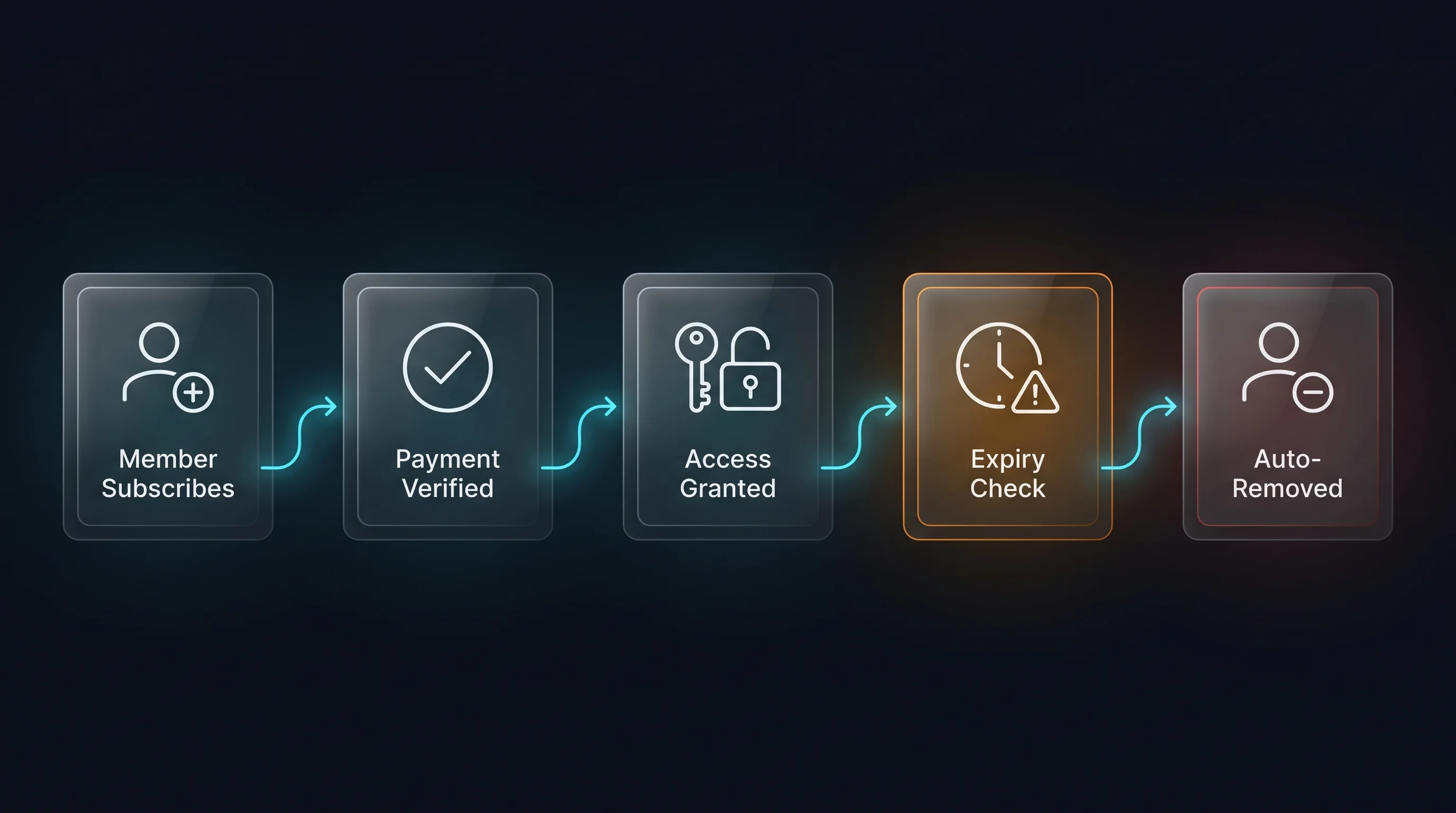
- The buyer purchases a Stars-priced access period. Stars is required for digital purchases inside Telegram bots and Mini Apps under Telegram’s rules.
- After Telegram confirms payment, GramBase creates the configured access and sends a private invite.
- The subscription records the expiry date.
- Reminders are scheduled before expiry: 7 days, 3 days, 1 day and 30 minutes.
- Periodic expiry checks attempt to remove the member and revoke the invite.
There is no automatic second charge. The member renews by purchasing again or using a renewal link. Do not invent a default grace period or promise removal at the exact expiry second.
Removal is best-effort. Telegram can refuse to remove a group owner, and incorrect bot permissions can prevent enforcement. The subscription can expire in GramBase’s records even if the person remains in the group. Inspect the result and use the subscriber Fix action where applicable. The subscription documentation describes Extend, Regenerate invite, Renew link and recovery behavior.
For setup, follow creating a paid Telegram channel, or review the paid-channel use case. Other membership tools should be evaluated on the same purchase, joining, renewal and expiry lifecycle; InviteMember alternatives explains the comparisons without assuming every vendor has the same settlement architecture.
Removal versus a persistent ban
The Bot API exposes banChatMember and unbanChatMember. A bot may use a ban/unban sequence as part of removing someone. User-facing “kick” and API method names are not interchangeable guarantees.
For expired membership, test that a returning buyer can purchase again and join through a fresh invite. For a spammer, a persistent ban may be appropriate. An invite that was revoked should not become reusable merely because a different member renews.
Before enabling a bulk rule
Review the exact Telegram IDs affected, exempt owners/administrators as needed and explain the rule to members. Preserve active paid access. Start with a small batch and record both successes and failures.
Telegram API rate limits depend on the operation and error response. The general messaging limit of roughly 30 messages per second is not a guaranteed member-removal throughput. Handle rate-limit responses and pause when a result is uncertain; do not repeatedly remove people without checking the outcome.
Frequently asked questions
Can a bot remove expired paying members?
Yes, with the right permissions and entitlement records. GramBase checks expiry periodically and attempts removal; it does not guarantee that Telegram will accept every request.
Does a Stars payment enable automatic renewal?
No. The order purchases the selected access period. The member must place another order to renew; Renew link gives you the purchase link to send. Extend adjusts access time without taking another payment. Do not use Delete to troubleshoot an active subscriber: it deletes the record and attempts removal.
Which bot removes inactive members?
Choose one whose current documentation explicitly supports your activity rule. Verify how it measures activity and exempts members. Payment expiry is a separate feature from inactivity cleanup.
Can I kick everyone at once?
Do not assume a universal “remove all” control or guaranteed rate. Confirm the tool’s actual bulk feature and permissions, review the member list and test a small batch first.
What if a member pays again after removal?
Check the new paid order and entitlement, then issue the appropriate fresh invite. Test rejoining as part of launch rather than treating every ban/removal behavior as identical.
Configure subscription access in GramBase when that is the rule you need. Keep community moderation decisions separate from payment status.
Questions? DM @Kai, founder of GramBase.
Related guides
View all
How to Create a Paid Telegram Channel in 2026 (Step-by-Step)
Create a paid Telegram channel with Stars, bot permissions, a clear access period, manual renewal, expiry checks and a complete buyer-flow test.
 Kai | GramBase •
Telegram Community Automation: Lead More, Admin Less
Reduce Telegram membership administration with stable IDs, Stars checkout, renewal reminders and expiry checks, while keeping support and recovery clear.
Kai | GramBase • 
Can You Accept Payments Through Telegram? A Practical Guide
Yes: use Stars for digital sales inside Telegram bots and Mini Apps. Set up an offer, payment tracking, delivery and paid access with clear limits.
Kai | GramBase • Start Selling on Telegram Today
One link to sell products and memberships. Checkout and delivery stay inside Telegram.
Start Selling