





Localization
Where GramBase translates your catalog and support conversations for buyers, and where it still stops at one language.
GramBase translates specific, buyer-facing surfaces — not your whole business. This page covers what “localized” actually means wherever you see a Translations tab or AI generate action, and where that stops.
Overview
A buyer sees whichever language their session is in. If you’ve filled that language in — by hand or with AI — they see that version. If you haven’t, they see your original content instead; nothing is ever blank because a translation is missing. Two areas carry this per-language treatment today: your catalog (products and storefronts) and support conversations. Each is covered below.
Two-way translation in support
Support conversations are translated in both directions, per team rather than per conversation: when it’s on, every inbound buyer message is translated into your interface language, and every one of your replies is translated into the buyer’s language before it sends.
Turning it on or off is a team-wide decision, changed from one settings dialog reachable two ways in Support inbox — a banner shown above the thread while translation is off, and a persistent translation icon in the conversation header that stays reachable in every state. Only a team member with permission to manage support can change the setting; anyone else sees it as read-only.
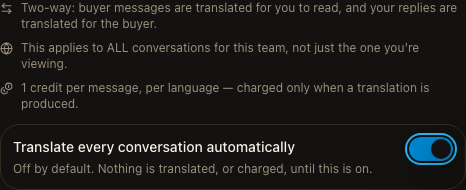
The dialog discloses the per-message, per-language credit cost before you turn it on, and translation is never triggered, and never charged, while the switch is off. A same-language reply is always sent as-is, never run through the AI. The header also shows a buyer-language badge — detected automatically from the conversation, or from the buyer’s Telegram client language, with a manual override available; overriding it only affects new messages, and existing translations are kept as they were.
Catalog translation
Two parts of your catalog carry per-language content today:
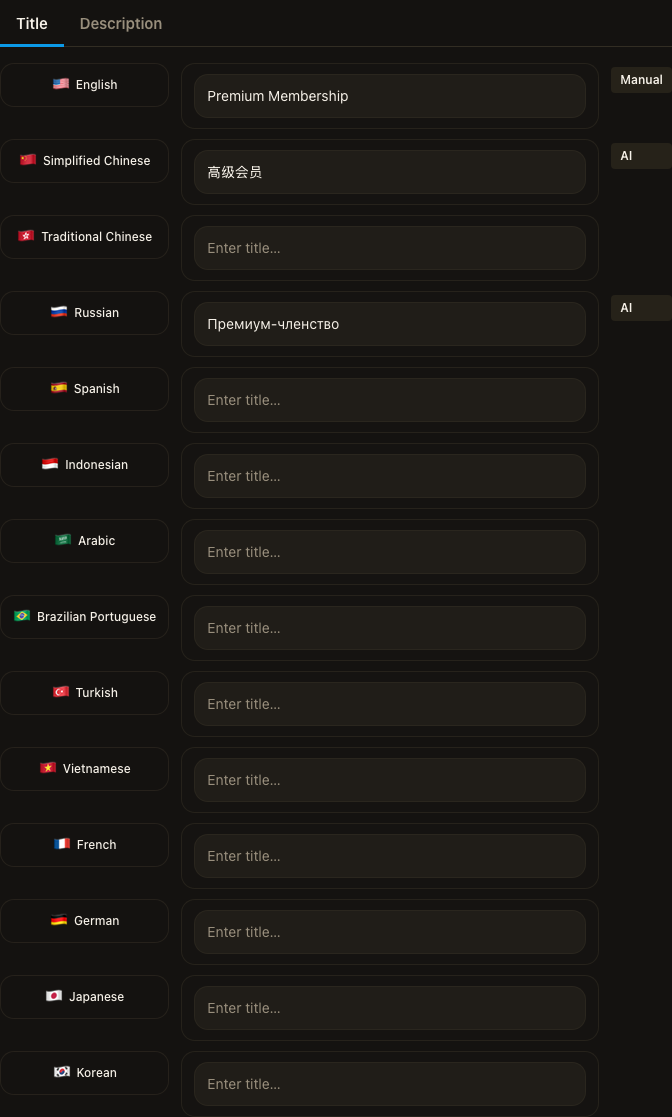
- Products — a product’s name, description, and (for a Paid Community product) each pricing tier’s name. See Products → Product translations.
- Storefronts — a storefront’s name and description. See Storefront → Storefront translations.
Both work the same way: open the Translations tab, fill a language by hand, or click Generate with AI to draft every configured language from your source content in one action. That single AI action costs 10 credits, however many languages it fills, and is rate-limited to 3 requests per team and 2 per person per minute.
What translation never touches
A few things stay out of AI’s reach by construction, not just by care:
- Prices never move. A product’s price and a pricing tier’s duration aren’t translatable fields at all — translation only ever touches display text (name, description, a tier’s name). There’s no field for a price to land in even if a translation tried to change it.
- Links and proper nouns are instructed to stay put. The AI is told explicitly to keep true proper nouns, brand names, model names, handles, and links unchanged unless your own instruction to it says otherwise — it isn’t rewriting your URLs into something else.
- A field you’ve edited by hand is never silently overwritten. Every translated field remembers whether it came from you or from AI. Running Generate with AI again fills in whatever is still blank or AI-authored; anything you’ve typed yourself is left alone.
Where translation stops
Nothing else is localized per reader yet:
- Broadcasts, group pinned/sticky messages, and scheduled messages are each sent as one message in one language — there’s no per-recipient language routing. AI copy polish can improve the wording of that one draft, but it doesn’t translate it.
- A product’s delivery message — the content actually sent to a buyer after payment — has no translation layer. Only the product’s catalog listing (name, description, tier name) is localized; what you configured as the delivery content is sent as written, in whichever language you wrote it.
- There is no workspace-wide localization setting that applies translation across every surface at once.
Known limits
- There is no single setting that localizes your whole business. Each surface below is translated on its own, and a surface not listed here is not translated at all.
- A language you haven't filled in — by hand or with AI — always falls back to your original content. It never shows blank or broken to a buyer.
Related
Was this page helpful?
Thanks — noted.