





Products
Create a product to sell on Telegram — a digital good or a paid group — price it, translate it, and organize your catalog into folders.
A product is one thing you sell: a digital good delivered once, or paid access to a Telegram group or channel that renews on a schedule. Everything else in Selling — storefronts, checkout, orders — points back to a product.
Product types
When you click Add Product, GramBase first asks what you’re selling:
- Digital Goods — “Sell accounts, access codes, files, or e-books. Content is sent to the buyer automatically after payment.” A one-off purchase: the buyer pays once and receives the delivery you configured.
- Paid Community (labelled Paid Group on the product badge and in filters) — “Monetize Telegram groups & channels with recurring billing and member management.” The buyer pays on a recurring schedule for continued access to one or more groups.
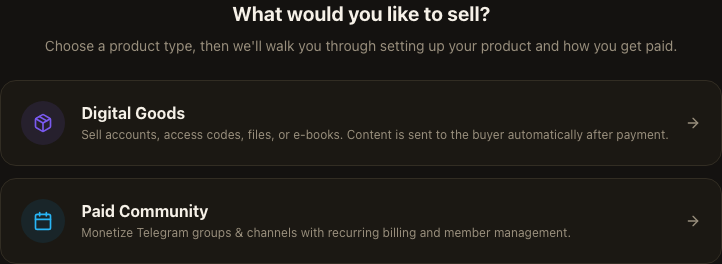
You can’t change a product’s type after creation — the two types walk different setup flows (delivery configuration for Digital Goods, group selection and pricing tiers for Paid Community) and the fields don’t map onto each other.
Add a product
From Products, click Add Product (or, at root, Add Product on the overview). After picking a type, the flow walks you through a short set of steps specific to that type — basic info, pricing/payment method, what buyers get, and extras — before creating the product. You can leave and resume: the dialog keeps your draft while it’s open.
Every product needs at minimum a name; digital products also need at least one way to receive payment. A subscription product needs at least one group selected and at least one pricing tier configured before it can be created.
Pricing
A Digital Goods product carries a single price, entered in USD, with up to
two decimal places. Setting the price to 0 releases the product for free.
Buyers can pay with USDT or USDC (stablecoins pegged to USD) on the crypto
rail, or with Telegram Stars if you enable that rail — Stars pricing is set
independently, as a raw Stars integer, because Telegram Stars has no
decimals.
A Paid Community product instead carries one or more pricing tiers (for example “1 Month”), each with its own duration and its own price per rail. At least one rail must be turned on per tier: crypto requires a USD price, and a Stars-only tier requires a Stars amount. One tier can be marked recommended — this is the option the buyer sees highlighted.
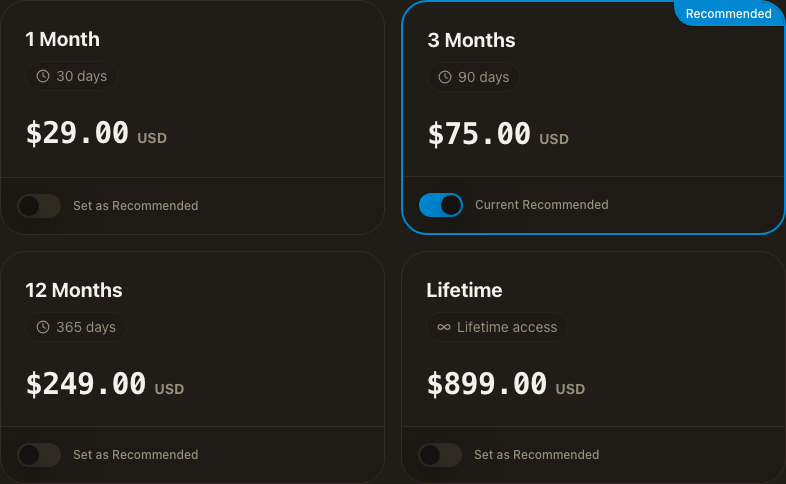
Crypto and Stars prices are tracked separately on the same tier, so turning one rail on or off, or changing its price, never touches the other rail’s price.
Product translations
Open a product and go to the Translations tab. It lists the fields buyers see — name, description, and (for subscriptions) each pricing tier’s name — with one column per language. A saved translation replaces what a buyer in that language sees; a language you haven’t filled in falls back to the original content, so leaving translations empty never breaks the page for a buyer.
AI generate all translations fills every configured language from the current source content in one action; edits you’ve made by hand are treated as source and are not silently overwritten by a later AI generation. Save commits your changes to the product.
Ordering and visibility
Every product carries a status: Active, Inactive, or Archived. The Products list lets you filter by status, and only active products are offered to a storefront’s product picker.
Being active is necessary but not sufficient for a buyer to see a product on a storefront: a storefront has its own product list, built by adding active products to it (Storefront → a store → Add Products) and removing them again. Within a storefront, you drag rows to reorder the lineup buyers see; the products list itself also supports drag-to-reorder, disabled while a type/status/search filter is active — clear the filters to reorder the full list.
Product folders
The Products list is a folder tree, same idea as a file explorer: a folder holds subfolders and products, and the root (“All products”) is the top level. Folders are a merchant-side organizing view only — buyers never see your folder structure, and a storefront’s product order and visibility are unaffected by which folder a product sits in.
A few rules worth knowing:
- Folder names must be unique among their siblings (case-insensitively), and folders can be nested only so many levels deep.
- Deleting a folder never deletes what’s inside it: its direct products and subfolders are promoted to the parent level instead.
- A product’s position (drag order) is tracked only among the siblings in its own folder level — moving a product to a different folder does not carry over its old position.
Known limits
- A product's type is fixed when you create it. Nothing updates it afterwards, so a Digital Goods product cannot become a Paid Community one, or the reverse — create a new product instead.
- Digital Goods and Paid Community are the only two product shapes. There is no separate service or physical-goods product.
Related
Was this page helpful?
Thanks — noted.