





Payments
Accept non-custodial crypto transfers or Telegram Stars, see how GramBase verifies each, and confirm a crypto payment manually when it can't.
Before you start
- To confirm a payment manually: the order uses crypto transfer and its payment status is pending, failed, or expired; you are a team member with the manage_orders permission; and you have already checked the transfer yourself — GramBase does not check it for you in this flow.
Two ways to get paid, each with its own settlement and its own limits.
Two ways to get paid
- Crypto transfer — non-custodial: a buyer sends funds straight to a wallet address you control, and GramBase watches the chain to confirm the order. GramBase never holds the funds and never has the private key.
- Telegram Stars (⭐) — Telegram’s own in-app currency. The buyer pays from stars they already hold in Telegram, no wallet or address involved.
Eight chains are live for crypto: Ethereum, BNB Smart Chain, Base, Arbitrum, Optimism, Solana, TON, and Tron, each with its own confirmation count before GramBase treats a transfer as settled (Ethereum 3, BNB Smart Chain 4, Base 3, Arbitrum 3, Optimism 3, Solana 2, TON 1, Tron 3). USDT and USDC are built into GramBase’s pricing on Ethereum, BNB Smart Chain, and Solana; USDT alone on Tron and TON — which tokens you can accept on a chain is whatever asset you configure on a receiving address.
Set up a receiving address
Receiving addresses live in Finance → Payment profiles, not on the product. Create a profile, name it, and add one or more crypto transfer methods — each one is a chain, a token, and the wallet address that should receive it. A profile can hold methods on more than one chain, and you attach it to a product from that product’s Pricing & Payment step.
Editing a profile’s address never changes orders already pending — a pending order keeps the exact address and amount it originally showed the buyer, and only new orders pick up the update.
How buyers pay with crypto
At checkout the buyer sees the exact amount and address to send, as a copyable string and a QR code, plus deep links into compatible wallet apps where available. A crypto order expires 30 minutes after it’s created if never paid.
On-chain verification
GramBase matches an incoming transfer to an order using, in order: a comment or memo match (wallets that support an on-chain comment compare it to the order id), an exact amount match, or an amount-fingerprint match (a few extra digits appended to the requested amount, so a same-size transfer sent without a comment can still be tied to one order). A transfer dated before the order was created is never matched, a fingerprint match on a transfer over an hour old is rejected past a 10% amount difference, and a transaction hash already linked to another order is never reused.
Once a match reaches the chain’s confirmation count, an exact-amount match confirms the order and starts delivery automatically. Any mismatch moves the order to pending review instead, where a team member approves or rejects it by hand.
You can also manually link a transaction: paste a hash and chain, and GramBase checks it succeeded, checks the recipient matches, and computes the amount difference — over 20% is rejected outright, 0–20% links but still needs review, an exact match links and confirms in one step. This keeps its own chain, recipient, and amount checks, unlike the manual confirmation below.
Confirm a payment manually
A buyer says they paid, but the order is still pending — maybe from a different wallet than expected, maybe outside the platform entirely. Automatic verification can’t move an order like that, and shouldn’t: it has no way to know what really happened. This is the manual way out, and it performs none of the chain, amount, or recipient checks the two paths above do — you do the checking, GramBase does the rest.
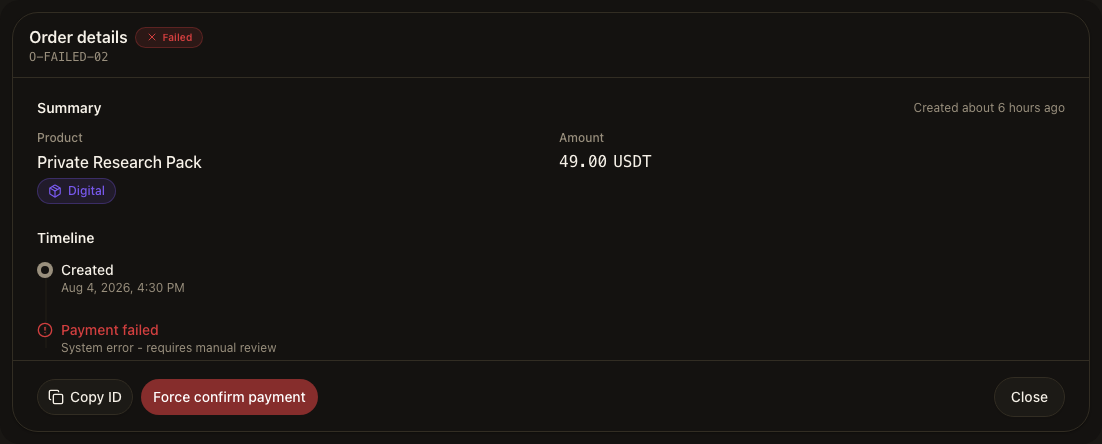
- Open Orders and click into the order.
- In the detail footer, choose the red Force confirm payment action — it appears only on eligible orders, and only in the detail view, never as a per-row action in the Orders table.
- Enter Payment evidence — a transaction hash, a receipt, or a short note (1–256 characters), stored separately from the order’s own hash.
- Read the warning and confirm you’ve checked the amount and recipient independently.
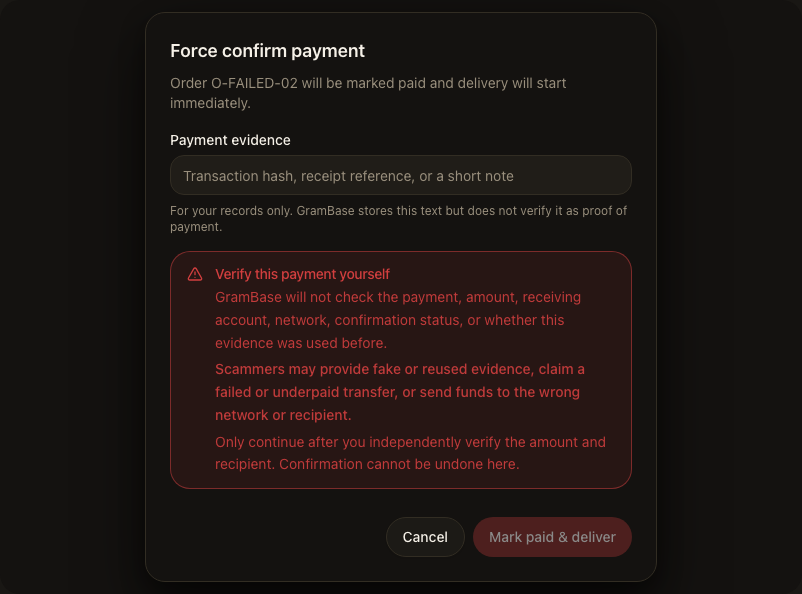
- Choose Mark paid & deliver.
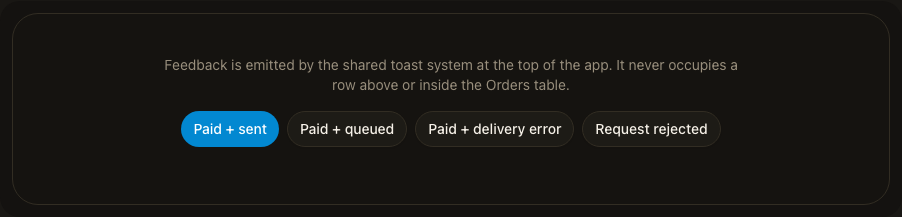
The order is treated as paid and enters the normal delivery flow — its own step, its own outcome (pending, sent, or error). A confirmed payment doesn’t by itself mean the buyer received anything; retry from the order detail if delivery errors.
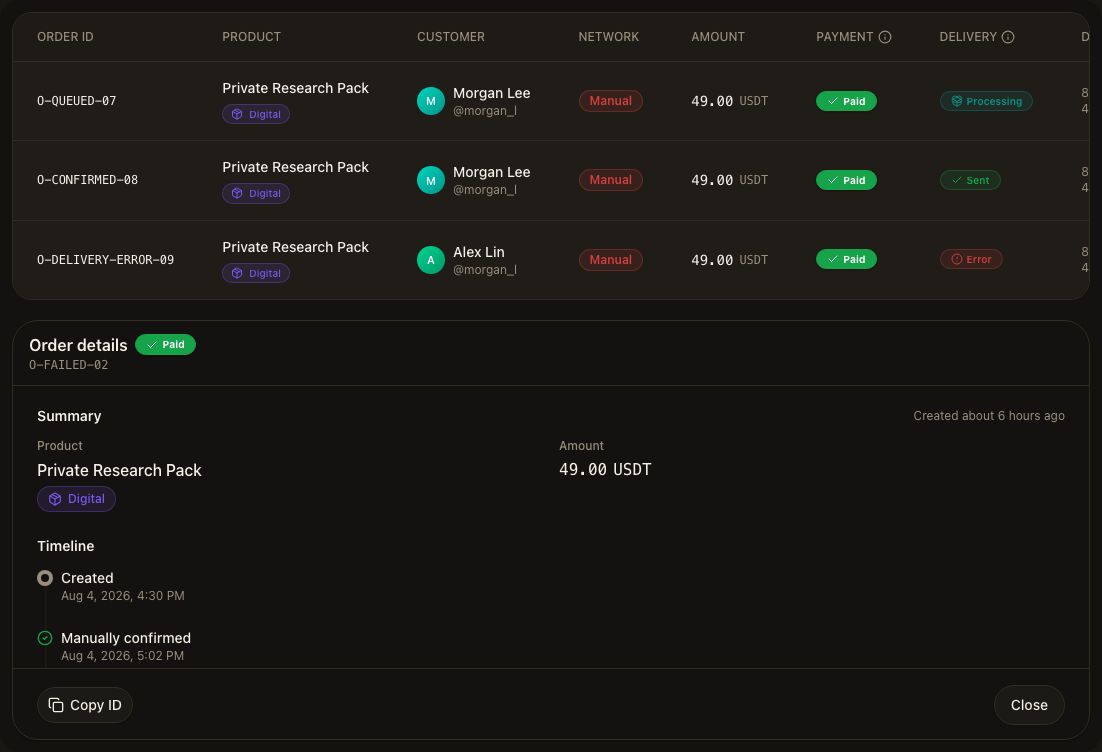
In the Orders list, the network column for that order now reads Manual — not the chain name, so the list never implies GramBase verified a network it never looked at. The original expected network and transaction hash stay on the order detail as separate facts, alongside your evidence.
An amount mismatch caught automatically or via manual link doesn’t fail the order either — it moves to pending review the same way, and every step (matches, rejections, links, reviews, manual confirmations) is appended to the order’s verification log.
Turn on Telegram Stars
Stars is a rail you switch on per product, on that product’s Pricing & Payment step, next to crypto — each rail has its own switch and save action, so toggling one never touches the other’s pricing. At least one rail must stay on. Every Stars invoice is minted by the bot that owns the order, in Telegram’s Stars currency (XTR); the buyer never leaves Telegram.
Pricing is native: you set the whole-star amount directly, and that’s the exact charge — GramBase shows two display-only USD estimates next to it (roughly what the buyer pays, roughly what you receive, since Telegram takes a cut between the two) but never converts a USD price at checkout time. If the product already has a USD crypto price, GramBase suggests a starting star amount to roughly match it — a starting point, not a locked conversion. Tiered subscription products need a star amount on every tier before Stars can be offered.
A Stars payment is a two-step Telegram exchange: a pre-checkout query your
bot must answer within 10 seconds (confirming the order is still pending,
unexpired, for the right buyer and amount — anything else gets a generic
“can’t be paid right now”), then Telegram’s successful_payment event,
which GramBase records as a receipt before doing anything else — the same
charge id can never be credited twice. A Stars invoice is one order, paid
once; GramBase doesn’t use Telegram’s recurring-billing API, so a
Stars-priced subscription doesn’t renew itself — send a renewal deep link
from the subscribers list, or the buyer places a new order.
Choosing a payment rail
- Settlement — crypto needs a chain’s confirmation count; Stars settles the moment Telegram sends its payment event, no count to wait for.
- Verification — a crypto order can enter manual review or be force-confirmed; a Stars order can’t, because that path only accepts crypto-transfer orders.
- What the buyer sees — Stars needs no wallet or address, paid from an existing balance, and shows first at checkout wherever it’s available.
Known limits
- GramBase does not query any payment network for a manual confirmation. It does not verify that a payment exists, matched the amount, or reached the right recipient — that check is yours.
- Payment evidence you enter for a manual confirmation is stored for your records only, never treated as verified proof.
- Stars orders are never chain-verified and can't be force-confirmed through the crypto override — GramBase confirms them only from Telegram's own payment event.
- A Stars invoice is a one-time charge. GramBase doesn't use Telegram's recurring billing, so a Stars subscription doesn't auto-renew.
Related
Was this page helpful?
Thanks — noted.